Emoji Battery & Shimeji Pets
- 4.6
- Rating
- 100.00K
- Installs
- Free
- Price

 Analysis by App-foxy
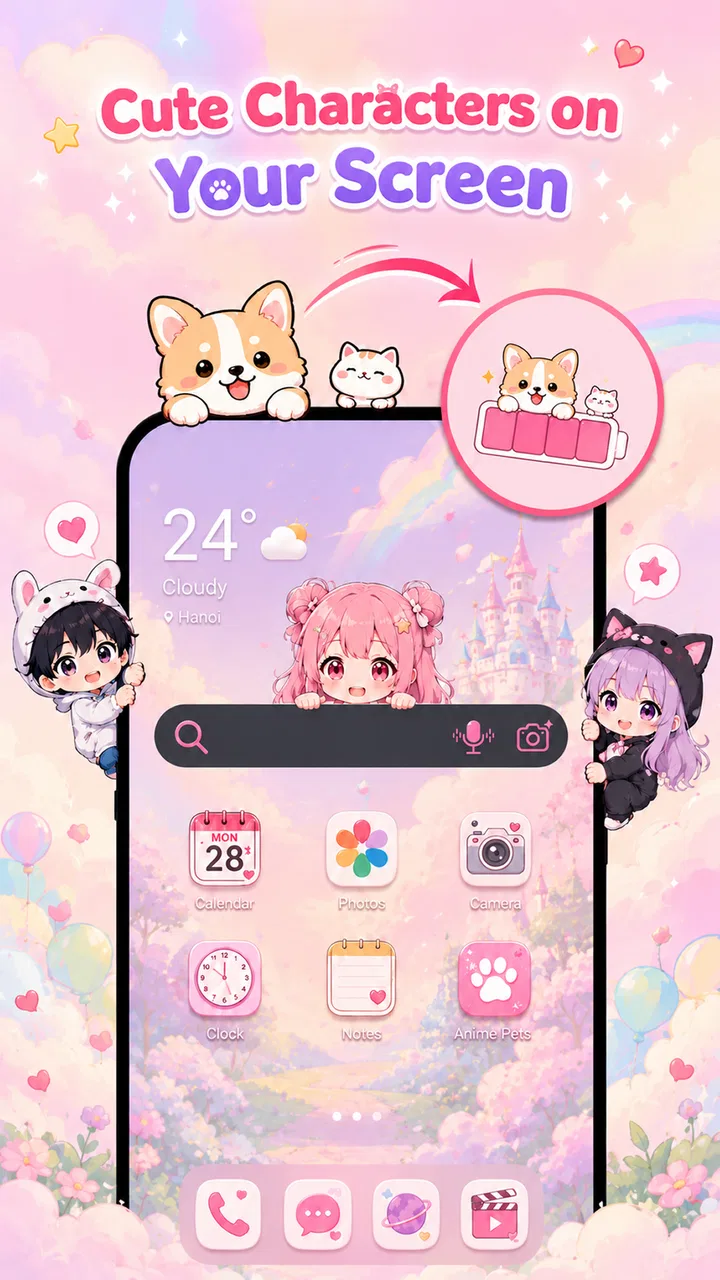
I approached Emoji Battery & Shimeji Pets expecting a small visual customization tool rather than a serious productivity system, and that is exactly where it makes the most sense. It gives an Android phone a more playful personality by combining an emoji-style battery indicator, customizable status-bar elements, and cute Shimeji pets that live on the screen. My overall view is positive, but with an important qualification: this is best understood as a lightweight personalization app for people who enjoy seeing their phone feel a little more like their own, not as a replacement for a full battery-management or notification utility.
The app comes from ZAppsolution and sits in the productivity category, although its practical value is tied more to everyday convenience and visual organization than to writing, planning, or task management. I found the appeal in the way small interface details become easier to notice. A battery icon is normally something I glance at and forget; turning it into an emoji-based element makes that glance more expressive. The Shimeji pets add an animated companion-like layer, while the status-bar customization helps the top edge of the screen feel less fixed.
The strongest reason to try it is the combination of information and personality. Many customization tools focus only on wallpapers, icons, or widgets. This one works in a narrower space: the parts of the display I see constantly but rarely think about. That makes it especially interesting for someone who wants a visible change without rebuilding the entire home screen.
You May Also Like

 Pandora - Music & Podcasts
Pandora’s Music Is Easy to Start, but Harder to Recover
Pandora’s strength is its low-effort path from a seed to a station. Its weak spot is how much confidence it asks you to place in connection, setup, and quiet recovery.

 8 Ball Pool
 Is Built on Rivalries, Rematches, and Routine
A close look at the rivalries, rematches, shared routines, and unanswered safety questions that turn a quick pool match into a persistent mobile community.

 Samsung Music
’s Quiet Strength Is Playing What You Already Own
Its reach comes less from spectacle than from dependable access to a personal library. That simplicity is both the app’s strongest retention engine and its ceiling.

 AccuWeather: Weather Radar
AccuWeather Review: A Quick, Clear Forecast for Everyday Decisions
For everyday plans, the best forecast is the one you can understand quickly. AccuWeather makes rain timing, radar, and local conditions easy to act on, with a few trade-offs.

 Hill Climb Racing
Why Hill Climb Racing Still Turns Crashes Into One More Run
A tiny car, a bumpy hill and one more upgrade: Hill Climb Racing keeps resurfacing because its simple chaos makes every near-miss feel personal.

 AliExpress - Shopping App
AliExpress Makes Global Shopping Feel Personal, but Shoppers Bear the Risk
AliExpress turns a global marketplace into a pocket-sized discovery engine. Its reach is useful, its shopping loop compelling, and its trade-offs easy to miss.
More From Our News Desk
View All News


What using the app feels like in daily life
The first thing I would suggest is starting with one change instead of activating every decorative option at once. The emoji battery icon is the clearest place to begin because it has an obvious purpose. I can check the phone’s charge state while also giving the interface a preferred mood. After that, I would add a Shimeji pet and adjust the status bar only if the screen still feels readable. This order matters because visual customization can become distracting when several elements compete for attention.
A realistic use case is a long workday when I repeatedly check the phone between messages, calendar checks, and short breaks. The battery indicator remains useful, but the changing visual treatment makes the interface less monotonous. For a student, the same idea can make a personal device feel more cheerful during study sessions. For a family member who enjoys cute characters, the pets may be the main attraction rather than the battery feature. I can also see it working well on a secondary phone that someone wants to make more distinctive without installing a complete launcher.
The Shimeji concept is particularly suited to people who like animated desktop companions or character-based decoration. It adds movement to an otherwise static screen, which can make the phone feel lively. At the same time, that movement is not automatically a benefit. If I am reading, navigating, or trying to concentrate, a character appearing near an important area could become an annoyance. The app is therefore strongest when the user treats the pets as optional decoration rather than as something that must remain active all day.
That distinction also answers an important practical question: is this a battery-saving app? I would not choose it for that purpose. Its identity is visual customization, and the battery feature is primarily an expressive way to display charge information. Anyone looking for detailed battery health, charging analysis, temperature history, or power-saving automation should use a dedicated battery utility instead. Emoji Battery & Shimeji Pets is more about how battery information appears than about diagnosing or improving battery performance.
Why the small interface changes matter
Status-bar customization can be more useful than it sounds because it affects a part of the phone that remains visible across many apps. A wallpaper disappears when I open another screen, but a status-bar adjustment can continue to shape the experience throughout the day. That gives the app a broader reach than a simple decorative image. The trade-off is that the top edge of the display has limited space, so adding too much can make it harder to identify the information I actually need.
I found the best approach is to decide what should remain immediately legible before choosing a more playful appearance. If the battery icon becomes too unusual, I may hesitate when checking the charge level. If the status bar becomes crowded, the customization has gone too far. The app works better when its decorative layer supports quick recognition instead of replacing it.
Another non-obvious strength is that the three elements can be treated as separate levels of commitment. The emoji battery icon is a modest change. Status-bar customization is more persistent. A Shimeji pet is the most attention-grabbing option because it introduces an on-screen character. This lets different users stop at different points. Someone who wants a subtle refresh can use the battery treatment alone, while a more enthusiastic fan of cute interfaces can combine all three.
That modular way of using it is also helpful when troubleshooting visual clutter. Rather than abandoning the app after the screen feels busy, I would disable the pet first, then simplify the status bar, and keep the battery treatment if it remains useful. This is a practical workflow that is easy to overlook when an app presents several attractive options together.
How it compares with ordinary alternatives
The usual alternative is to leave the standard battery icon and status bar untouched, then personalize the phone with a wallpaper or icon pack. That route is calmer and usually easier to live with, especially for people who prefer a clean interface. It also avoids the risk that decorative elements compete with notifications or navigation. If my priority were speed, minimalism, or professional presentation, I would choose the conventional setup.
Another alternative is a launcher-based customization system. Launchers can change home-screen layouts, gestures, icons, and widgets in a much broader way. They are better for users who want to redesign the entire phone. Emoji Battery & Shimeji Pets is more focused and less demanding conceptually: it changes a few highly visible details without asking me to replace the whole home-screen experience. That narrower scope is its advantage for casual customization, but also its limitation for advanced theming.
Dedicated battery applications are a different comparison altogether. They are preferable when I need charts, charging history, alerts, or technical explanations. This app does not occupy that same role. Its battery feature is valuable because it makes a routine glance more enjoyable, not because it turns the phone into a monitoring dashboard. Understanding that difference prevents disappointment.
Compared with a simple animated wallpaper, the app has a more targeted effect. A wallpaper can be visually rich but often disappears behind open apps. A status-bar element and battery indicator stay closer to the information layer of the phone. In return, they require more restraint. A wallpaper can be ignored when I need focus; an active screen companion may remain visible at exactly the wrong moment.
The limitation I noticed most
The main weakness is the tension between charm and clarity. Cute characters and expressive battery visuals are enjoyable in short interactions, but the phone’s top area is also functional space. When I am checking a notification quickly or trying to read a small status symbol, extra decoration can slow down that glance. This is not a reason to reject the app, but it means the best setup will vary according to the phone’s screen size, interface layout, and the user’s tolerance for movement.
I would also be cautious about using a Shimeji pet during work calls, presentations, navigation, or any situation where an unexpected visual element could look unprofessional. The app is a poor fit for someone who wants every screen to remain visually quiet. It may also disappoint users who expect deep system controls, because its appeal comes from appearance rather than advanced device management.
The presence of optional purchases is another point to consider. The application is free to install, while in-app items range from around four dollars to around ten dollars each. I would begin with the free experience and only pay after deciding that the visual changes have a lasting place in my routine. A cute character can be exciting on the first day and less interesting later, so the purchase decision should be based on continued use rather than initial novelty.
The app is marked for Everyone, which matches its approachable theme. Still, an age-friendly rating does not mean every person will enjoy it. A child may love the pets, while an adult seeking a restrained work phone may find them unnecessary. The useful question is not whether the app is broadly accessible, but whether its playful presentation matches the way I use my device.
Who will get the most from it
I would recommend it to Android users who enjoy character-themed customization but do not want to install a full launcher or rebuild their home screen. It is also a good choice for someone who checks battery status often and wants that routine to feel more personal. Fans of emoji design, animated companions, and cute visual details are the natural audience.
It can suit a secondary device particularly well. On a personal tablet or spare phone, I may be more willing to experiment with a lively status bar and an on-screen pet than I would be on a device used for formal work. It can also make a gift phone feel more personal when the recipient enjoys playful interfaces, although I would avoid setting up too many changes before knowing their preferences.
I would skip it if my priorities are battery diagnostics, maximum concentration, a strictly professional appearance, or a completely uncluttered display. I would also choose a launcher if I wanted coordinated icons, home-screen gestures, and extensive layout control. The app is not trying to win those comparisons, and it should not be judged as though it were a full customization suite.
Compatibility and practical expectations
The current version is 1.0.1 and requires Android 8.0 or later. That gives it a reasonably broad starting point for Android users, though the exact visual result can still depend on the phone’s own interface and how it handles status-bar elements. I would check the first setup carefully rather than assuming every device will display the customization in exactly the same way.
One useful habit is to test the app during ordinary activities instead of judging it only from the setup screen. Open a few frequently used apps, read notifications, check the battery at different points in the day, and see whether the pet remains pleasant or becomes distracting. This kind of test reveals more than a quick look at the customization menu because the app’s success depends on how well its visual additions coexist with normal phone use.
The project has reached over one hundred thousand installs and holds a 4.6 average from roughly seven thousand ratings. Those figures suggest that the concept has found a real audience, but they do not remove the personal nature of the decision. A visual tool can be highly appealing to one user and unnecessary to another. I would treat the popularity as encouragement to try it, not as proof that every configuration will suit every phone.
It is also worth remembering that the app was released on July 17, 2026. With a relatively early version number, I would approach it as a focused product that may continue to develop rather than as a mature replacement for established system tools. That is not automatically negative; smaller, focused apps can be easier to understand. It simply makes it sensible to keep expectations centered on the advertised style of experience.
My recommendation after using it
My preferred setup would be conservative: begin with the emoji battery icon, keep the status bar readable, and add a Shimeji pet only when I want a stronger decorative effect. This preserves the app’s personality without allowing it to take over the interface. I would also avoid paying for extra items until I had used the free version across several normal days and knew which part I actually valued.
That recommendation captures the app’s central trade-off. Its best quality is not technical depth but the way it turns overlooked system details into a small source of enjoyment. Its biggest weakness is that the same details can become visual noise when I need focus. The right configuration is therefore less about activating everything and more about choosing the one feature that improves the way I interact with the phone.
In the end, I see Emoji Battery & Shimeji Pets as a charming, narrowly defined customization app with a clear audience. ZAppsolution has combined a practical glance point with expressive design, then added optional animated companions for users who want more personality. I would recommend it to anyone who wants a friendlier Android interface and is comfortable making a few visual compromises. I would not recommend it as a battery-analysis tool or a complete theming platform. If you want your phone to feel more playful without redesigning every screen, it is worth trying; if you value silence and efficiency above decoration, the standard interface will probably serve you better.
FAQs for Emoji Battery & Shimeji Pets
01What is Emoji Battery & Shimeji Pets?
Emoji Battery & Shimeji Pets is a personalization app that combines a battery-status display with animated emoji-style characters and desktop companions called Shimeji. After installation, users can usually choose a character, customize its appearance or behavior, and let it appear on top of other screens while the battery widget or indicator provides a more playful way to check the device’s remaining charge.
02How does the battery feature work?
The battery feature is designed to show your phone’s current charge level through an emoji, character, widget, or animated visual. Depending on the device and app version, you may need to add a widget to the home screen or allow notification and overlay permissions. Battery readings are generally supplied by the operating system, although the visual style and update frequency can vary.
03What are Shimeji pets, and can they appear over other apps?
Shimeji pets are small animated characters that move around the screen, interact with edges, or perform simple actions while you use the phone. On Android, the app may request permission to display over other applications so the characters can remain visible. This permission is optional in many cases, but disabling it can prevent the pets from appearing outside the app or launcher.
04Does Emoji Battery & Shimeji Pets affect battery life or phone performance?
Because the app uses animations, background activity, widgets, or an overlay service, it may consume more battery and memory than a static wallpaper or ordinary icon. On newer devices the impact is often modest, but it can become more noticeable when several pets are active or animations run continuously. You can reduce the effect by limiting characters, disabling overlays, or stopping background activity.
05Is Emoji Battery & Shimeji Pets safe to use and free to download?
The app may be available as a free download, but some characters, customization options, or features can depend on advertisements, in-app purchases, or a premium version. Before installing, review the store listing, developer information, requested permissions, privacy policy, and recent user feedback. Avoid granting access that is unrelated to the app’s battery, widget, notification, or overlay functions.
Pros
- Cute animated pets make checking battery levels more enjoyable.
- Battery information is visible at a glance through the home-screen widget.
- Shimeji characters add personality without requiring complicated setup.
- Includes multiple emoji-style designs to match different preferences.
- Lightweight concept that is easy for children and casual users to understand.
Cons
- Animated characters may feel distracting on a busy home screen.
- Some pets
- themes
- or features may require in-app purchases.
- Widgets can use additional battery depending on animation settings.
- Customization options may be limited compared with dedicated widget apps.
- Compatibility and widget behavior can vary across Android launchers and iOS versions.

Emoji Battery & Shimeji Pets
Gallery